Short answer
I wanted AI to draft blog posts but I did not want AI publishing them. So the
pipeline stops at draft. A script turns a markdown file in my Obsidian vault
into a WordPress draft — featured image generated from the title, SEO metadata
filled in, FAQ schema attached — and then it stops and waits. I read the
preview, and a second command puts it live. Setup took an afternoon. The
review step costs about two minutes per post, and it is the only reason the
output is worth reading.
Why the human gate is the whole point
My first attempt at this blog died with eight finished drafts and zero
published posts. The bottleneck was not writing. It was a manual image step
sitting in the middle of the pipeline: I had decided each post needed a
hand-made featured image in Photoshop. Every post was blocked behind a task I
never felt like doing. Two publishing schedules came and went. Nothing shipped.
The lesson was not “automate everything.” It was more specific than that:
Automate the steps that are mechanical and boring. Keep the steps that
require judgment. Never let a mechanical step block a judgment step.
Image generation is mechanical. Metadata entry is mechanical. Deciding whether
a post is accurate and worth a reader’s time is judgment. So the pipeline does
the first two completely and the third not at all.
The pipeline was itself built this way, with an agent doing the mechanical parts
and a gate I kept for myself. That working style — including the parts that cost
me time — is written up here.
What the pipeline actually does
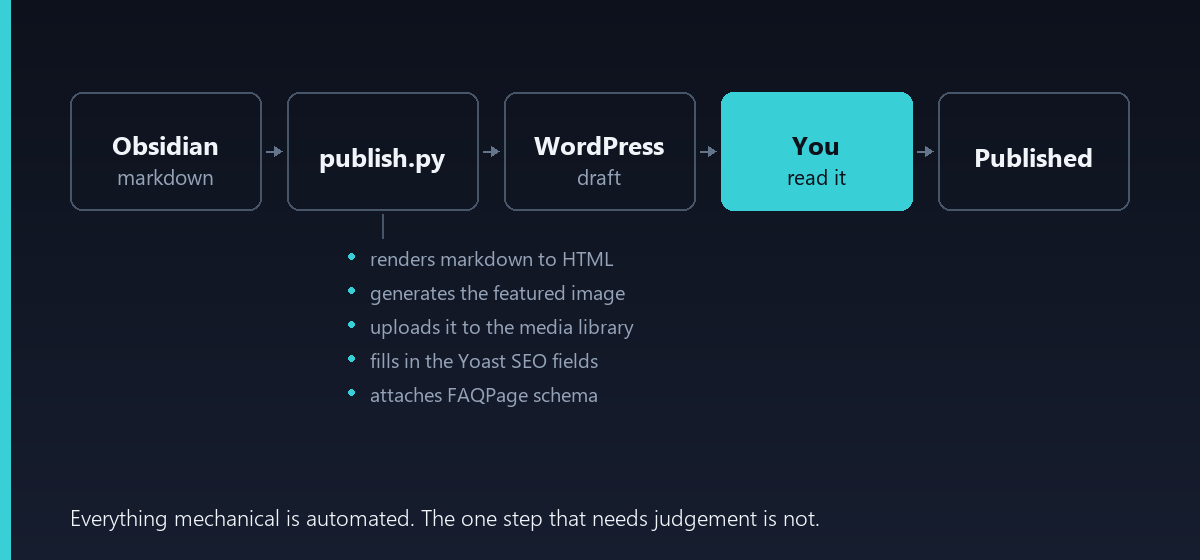
The highlighted box is the entire design. Four of the five steps happen without
me; the fourth does not happen without me at all.
Three files, roughly 400 lines of Python total:
| File | Job |
|---|---|
brand.py |
Colors, fonts, site name. Change once, every future image follows. |
make_image.py |
Title in, 1200×675 PNG out. |
wp_client.py |
WordPress REST calls with Application Password auth. |
publish.py |
Orchestrates the above; the only file I actually run. |
The whole workflow is four commands:
python publish.py post.md          # upload as draft, image and metadata included
python publish.py --list           # show drafts waiting, with preview links
# ... read the preview ...
python publish.py --publish <slug> # go live
How do you authenticate a script to WordPress?
Application Passwords, built into WordPress core since 5.6. Go to
Users → Profile → Application Passwords, name it, and WordPress hands you a
24-character credential — once. It authenticates over standard HTTP Basic auth
against the REST API and can be revoked independently of your real password.
The REST handbook covers the mechanics in
Authentication.
session = requests.Session()
session.auth = (WP_USER, WP_APP_PASSWORD)
That is the entire auth layer. The credential lives in a gitignored .env
file, never in the script.
One detail worth knowing: verify with GET /wp-json/wp/v2/users/me rather than
just posting and hoping. A bad credential on a write endpoint can return a
confusing permissions error instead of a clean 401.
Speaking of clean 401s.
The two mistakes that cost me an evening
I could describe the setup as smooth. It was not, and the failures turned out
to be more useful than the parts that worked, so here they are.
Mistake 1: I filled in the example file
The pipeline ships a .env.example. You copy it to .env and fill in the
copy. I filled in the example.
Then I ran the script, and it told me my credentials were missing. I read that
message while looking directly at a file containing my credentials, and briefly
questioned the nature of reality.
The file is named example for a reason. The script reads .env. These are
two different files. I would prefer not to say how long that took.
Mistake 2: I used the wrong username
This one I feel better about, because I think it catches a lot of people.
When you create an application password, WordPress presents a field labeled
“New application password name.” You type something into it —
metavida-pipeline, in my case. WordPress then generates the 24-character
password.
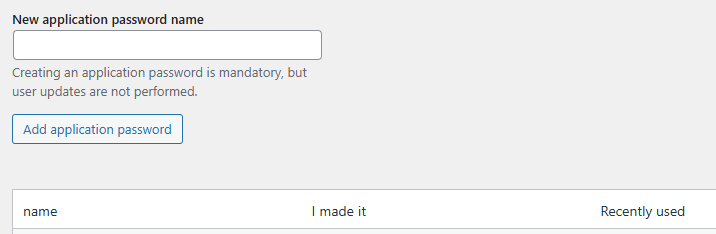
Look at that screen for a second. One text field, and the word “name” right
there in the label. You walk away holding a name and a password. Your config
file is asking for a username and a password. Two things, two slots, the shapes
match. Reader, they do not go together.
That name is only a label, so you can find and revoke that specific password
later. It plays no part in authentication whatsoever. WP_USER wants your
WordPress login ID — the thing you type at wp-login.php. Mine was the
short, unimaginative default you end up with when you click through the
installer without thinking about it. I had confidently supplied seventeen
characters of something else entirely.
Why it took an evening instead of a minute
Here is the genuinely interesting part.
WordPress returns 401 rest_not_logged_in for a wrong username. It returns the
same thing for a wrong password, for a revoked password, and for an
Authorization header the web server never forwarded to PHP. Every distinct
failure, one indistinguishable error.
So I tried to narrow it down: send deliberately fake credentials, on the theory
that a real authentication failure would look different from no credentials at
all. It did not look different. I took that identical result as proof that the
server was stripping the Authorization header, and went off to rewrite Apache
configuration for a problem I did not have.
The site runs mod_php, which populates those credentials natively. The header
had been arriving correctly the entire time.
A test that returns the same answer no matter what the cause is cannot
identify the cause. I knew this. I used the test anyway, because it agreed
with the theory I had already picked. That is the actual lesson, and it is not
really about WordPress.
The fix, once found, was one word on one line.
So the script now does the check I should have done first. On a 401 it queries
the users endpoint and compares what you configured against the accounts that
exist, so the output reads something like:
WP_USER is 'my-pipeline', but the accounts on this site are: 'jsmith'.
That mismatch is almost certainly the problem — set WP_USER to the login name.
Any hole you personally fall into is worth paving over in the tooling. You will
not remember the lesson in six months. The script will.
Solving the image problem in 120 lines
This was the thing that killed the previous attempt, so it got solved properly.
The generator draws a vertical gradient, stamps a faint dot grid over it, and
sets the title in the largest font size that still fits in four lines. Each
category gets its own accent color, so the section is recognizable at a glance
in a social preview.
The only non-obvious part is fitting the title. You do not know in advance how
many lines a headline will take, so you search downward for a size that works:
def _fit_title(title, font_path, max_width, max_lines=4):
    """Pick the largest font size where the title still fits in max_lines."""
    for size in range(72, 33, -2):
        font = ImageFont.truetype(str(font_path), size)
        avg_char = font.getlength("abcdefghijklmnopqrstuvwxyz ") / 27
        lines = textwrap.wrap(title, width=max(int(max_width / avg_char), 10))
        if len(lines) <= max_lines and all(
            font.getlength(line) <= max_width for line in lines
        ):
            return font, lines
A short headline renders large, a long one steps down until it fits. No manual
adjustment, ever. Total dependency:
Pillow.
Is it as good as a designed image? No. Is it better than the zero images I
produced in three months of intending to make them by hand? Considerably.
The Yoast trap that costs an afternoon
Here is the part that will waste your time if nobody warns you.
You send a post to the REST API with Yoast fields in the meta object. The
request returns 201 Created. Everything looks fine. You open the post in
WordPress and the SEO fields are empty.
Yoast registers its meta keys without REST write access. WordPress accepts
your payload, ignores the unregistered keys, and reports success. There is no
error. It just quietly does not work.
The fix is to register the fields yourself with
register_post_meta(),
whose show_in_rest argument is the whole story. Install the Code Snippets
plugin and add:
add_action('init', function () {
    $fields = ['_yoast_wpseo_title', '_yoast_wpseo_metadesc', '_yoast_wpseo_focuskw'];
    foreach ($fields as $field) {
        register_post_meta('post', $field, [
            'show_in_rest'  => true,
            'single'        => true,
            'type'          => 'string',
            'auth_callback' => function () {
                return current_user_can('edit_posts');
            },
        ]);
    }
});
After that the standard /wp/v2/posts endpoint accepts them normally.
Because this failure is silent, the script checks for it explicitly and warns
rather than reporting a false success:
if not result.get("meta", {}).get("_yoast_wpseo_metadesc"):
    print("  ! Yoast meta did not persist — install the REST snippet")
Any pipeline step that can fail quietly deserves an assertion like this. Silent
failure in an automated system is worse than a crash, because you find out
weeks later.
Structuring posts for AI search, not just Google
Since the pipeline generates the page anyway, it may as well emit the structure
that generative engines look for. Two things go in automatically:
FAQ schema. The frontmatter carries a faq list, and the script converts
it to FAQPage JSON-LD appended to the post body.
Question-and-answer pairs are among the most reliably cited structures in
AI-generated answers.
A quotable answer block. Every post opens with a two-to-three sentence
direct answer that makes sense lifted out of context — because that is exactly
how a generative engine will use it. This is a template rule rather than
something the script enforces, but it is the highest-leverage habit in the
whole system.
The rest is unchanged from ordinary SEO practice: question-shaped headings,
comparison tables, primary sources linked, and — the part no automation can
supply — something you actually did yourself.
What I would do differently
Start with the human gate, not with full automation. My instinct was to
build the fully automatic version and add review later. That order is wrong.
The gate is what makes the output defensible; the automation is just
convenience around it.
Do not put the orchestrator on the same box as the site. My WordPress runs
on a 2 GB Lightsail instance. Adding a workflow engine to it would have meant
one machine where both the publishing tooling and the public site fail
together. The scripts run locally and talk to the site over HTTPS. Nothing to
open, nothing extra to keep alive.
Solve the boring blocker first. I spent three months intending to make
images and zero afternoons writing the generator. The generator took two hours.
FAQ
Can you publish to WordPress from a script?
Yes. WordPress ships a REST API, and Application Passwords give a script its
own credential without exposing your login. A POST to /wp-json/wp/v2/posts
creates a post; setting status to draft means nothing goes live until a
human approves it.
Why doesn’t Yoast SEO metadata save through the REST API?
Yoast registers its meta fields without REST write access, so a POST containing
them succeeds but silently drops the values. Registering the three fields
yourself with register_post_meta and show_in_rest set to true fixes it in
about twenty lines of PHP.
Should an AI writing pipeline publish automatically?
No. Fully automatic publishing produces content that reads as generic and
carries factual errors nobody caught. Stopping the pipeline at draft status
costs about two minutes per post and is the difference between a site worth
reading and a content farm.
Why does WordPress return 401 rest_not_logged_in when my application password is correct?
WordPress uses that single error for every application password failure: wrong
username, wrong password, revoked password, or an Authorization header the web
server dropped. Check the username first. It must be your WordPress login ID,
not the name you typed when creating the application password.
Wrapping up
The interesting decision in this build was not any piece of the automation. It
was where to stop. Everything mechanical is gone — no image editor, no metadata
forms, no copy-paste into an editor. Everything requiring judgment is still
mine, and it is now the only thing left to do.
If you are building something similar, start with the step you have been
avoiding. That is your real bottleneck, and it is probably smaller than the
three months you have spent not doing it.
One last thing. If you came here hoping for a tutorial by someone who got it
right on the first attempt, you will have noticed some way back that this is
not that. I fill in example files. I mistake a label for a username. I trust a
test that cannot possibly prove the thing I want it to prove, because it agrees
with me.
I am going to keep writing these up as they happen, dents included. The
sanitized version of this post would have run four hundred words and been worth
none of them — the useful parts are all downstream of something going wrong.
So if watching someone blunder forward through AI tooling, one bruise at a
time, sounds like your kind of thing: there is plenty more where this came
from. I have a long backlog and a demonstrated talent for finding the rake in
the grass.